
Building Monica: we built the database browser we wanted for Laravel
While rebuilding Monica, we built a small read-only database browser for Laravel and decided to release it as a standalone package.
This is another article in the Building Monica series, where I write about the process of rebuilding Monica from scratch. Most of the articles in this series will probably be about the product itself: relationships, reminders, customization, activities, privacy, and all the questions that come with trying to represent people's lives in software. But rebuilding a large application also produces smaller things along the way. LaraDB is one of them.
While working on Monica v3, I found myself spending a lot of time looking directly at the database. This is not particularly unusual when building a Laravel application. You create a contact and check what was written. You create a relationship and inspect the related rows. You change a reminder and verify the dates. You run an action, refresh the data, follow a foreign key, and repeat the process many times during the day.
There are already many good ways to do this. Tinker is useful but not simple and quick to use. Applications like TablePlus, DBeaver, phpMyAdmin or Adminer can be super useful, but not for a quick lookup. I use TablePlus regularly, especially when I need to write queries, edit data or inspect the schema in detail. But most of the time, while developing Monica, I did not need a database management tool. I only wanted a quick way to see what was in the database without leaving the application I was already working in.
That was the initial idea behind LaraDB. Install a development dependency, visit /db, and see the database.
composer require --dev monicahq/laradb
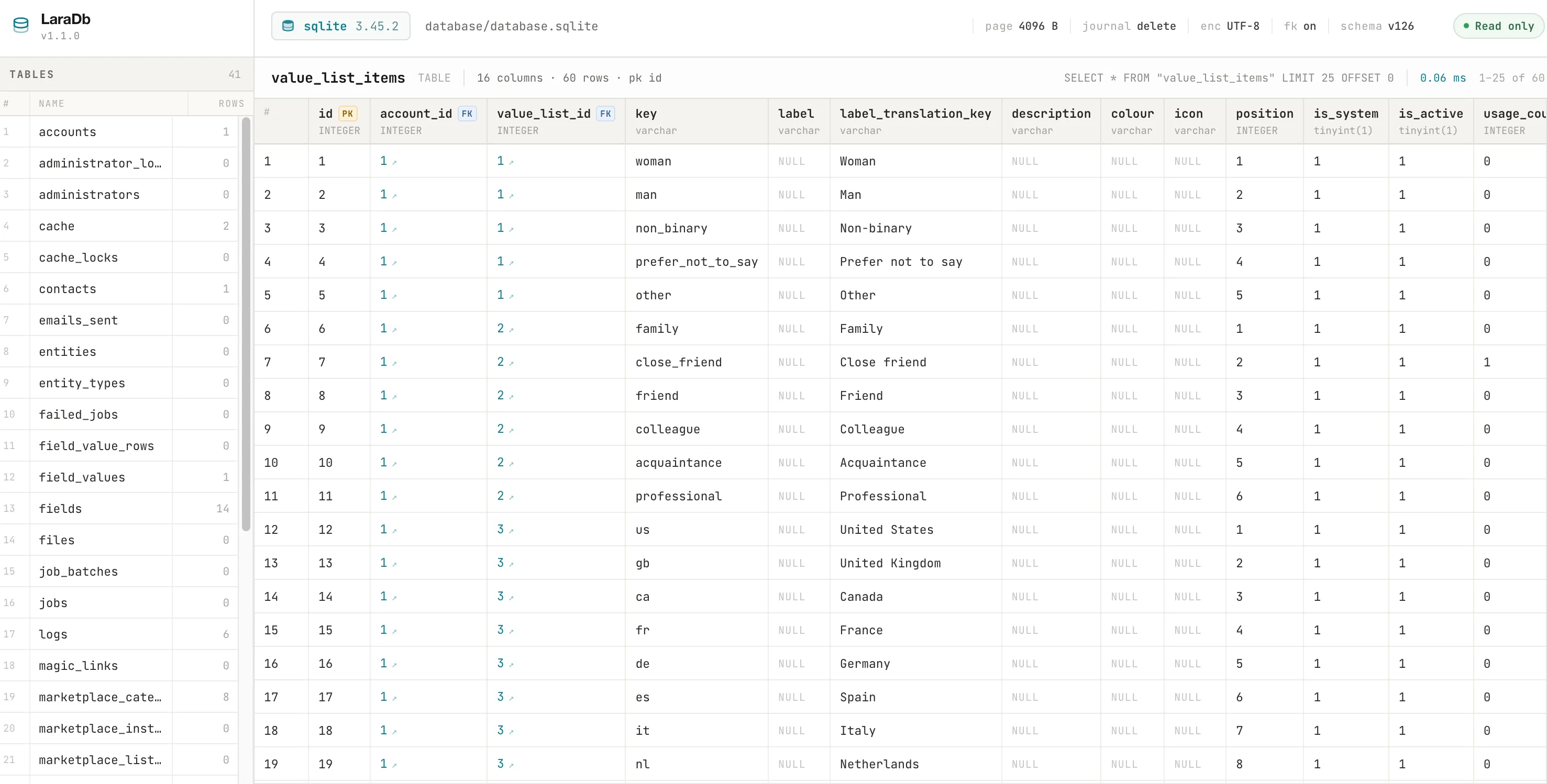
What you get is super simple. Tables are displayed on the left, rows on the right, and the page runs inside the Laravel application itself. LaraDB supports SQLite, MySQL and MariaDB, and PostgreSQL.
A browser rather than a database manager
The most important decision we made was to keep LaraDB read-only. It does not have an edit button, a delete button, an insert form or a SQL console. Both routes exposed by the package are GET routes, and the package only issues SELECT statements.
This is partly a safety decision, but it is mostly about scope. There are already mature tools for managing databases, and reproducing a subset of their features inside Laravel would not make LaraDB more useful for the problem we were trying to solve.
The package also avoids accepting arbitrary identifiers or queries from the browser. A requested table must first exist in the schema discovered by the driver. Identifiers are quoted according to the database engine. Values used when following foreign keys are bound as parameters. There is no interface for submitting arbitrary SQL because arbitrary SQL is not part of the package's purpose.
A small tool can remain understandable if it has a very precise job. LaraDB is intended to answer what is currently in the database and how those rows relate to one another. It is not intended to become a replacement for a proper database client.
What we ended up needing
The interface reflects that narrow scope. LaraDB lists the tables in the current schema and displays their rows in a dense table. Column types are shown, primary and foreign keys are identified, NULL values are visually distinct from empty strings, and long values are truncated so that large text or JSON columns do not make the page unusable.
Foreign keys turned out to be one of the more useful features for Monica. If a column references another table, its value can be followed directly. Clicking it opens the referenced table filtered to the corresponding row. This is especially useful in Monica v3 because a growing number of domains are represented through explicit relationships between several tables rather than through large, self-contained records.
The page also exposes some context about the current database and query. Depending on what the database engine makes available, LaraDB can display the engine and version, database name, size, index count and other engine-specific metadata. For the current page, it also shows the SQL statement that produced the result and how long the query took.
There is also a JSON representation of a table. This was inexpensive to add once the database layer was separated from the HTML rendering and has proved useful when inspecting data outside the page itself.
The frontend is intentionally self-contained. The package ships its own CSS and JavaScript and does not depend on the host application's asset pipeline. Installing LaraDB should not require adding Tailwind configuration, an Alpine dependency or another build step to an existing project.
The database abstraction became the real work
Displaying rows in a browser is straightforward. Supporting SQLite, MySQL and PostgreSQL consistently is where most of the interesting work ended up happening.
The engines differ significantly in the way they expose schema and database metadata. Listing tables, describing columns, finding primary keys, resolving foreign keys, counting rows and retrieving database-level information all require different queries depending on the engine. Even details such as identifier quoting need to be handled correctly rather than treated as a generic SQL operation.
LaraDB hides these differences behind a small driver interface. The Laravel layer asks for tables, columns, rows and metadata without needing to know whether the underlying connection is SQLite, MySQL or PostgreSQL.
A simplified part of the contract looks like this:
public function listTables(): array;

public function getColumns(string $table): array;

public function getRowCount(
    string $table,
    ?RowFilter $filter = null,
): int;

public function getRows(
    string $table,
    int $page,
    int $perPage,
    ?RowFilter $filter = null,
): TablePage;

public function getForeignKeys(string $table): array;
Each database driver implements those operations differently, while the rest of LaraDB works with the common result objects returned by the interface.
An interesting consequence of this design is that the core database-reading code does not depend on Laravel at all. It works directly with PDO. Laravel is responsible for package discovery, configuration, routing and rendering, but the actual database inspection can be used separately.
use LaraDb\DriverFactory;

$pdo = new PDO('sqlite:database.sqlite');
$driver = DriverFactory::fromPdo($pdo);

foreach ($driver->listTables() as $table) {
    echo $table->name;
}
Read-only is not the same as harmless
The package being read-only prevents it from corrupting the database, but it does not make exposing the database harmless. A database browser can reveal every row in every table to anyone who is able to reach it, which is obviously a serious concern for an application such as Monica.
For that reason, LaraDB is designed to be installed as a development dependency.
composer require --dev monicahq/laradb
A normal production deployment using composer install --no-dev will not contain the package. LaraDB is also disabled outside the local environment by default, and its routes use the web and auth middleware by default when they are enabled.
Small things that come out of a larger rebuild
When I started the Building Monica series, I expected most of the writing to focus on the large architectural and product decisions behind Monica v3. That will still be the case. But I also want to document some of the smaller tools and ideas that come out of the rebuild, because they are part of the work too.
LaraDB is not a major part of Monica v3, and it is not trying to become a major product by itself. It is simply a small development tool that removed a recurring annoyance for us. The package is useful precisely because its scope is limited, and I would like to keep it that way.
If you work on Laravel applications and often open a database client only to inspect what your code just wrote, LaraDB may be useful to you as well.
composer require --dev monicahq/laradb
Then visit /db.
The source code is available at github.com/monicahq/laradb.